Book a demo
  1. Home
  2. Health & allied health
  3. Careful wording & sign-off
Review and sign-off

Every change checked before patients see it

Health advertising has rules, and the person writing the copy is not always the person who should approve it. WebDirector separates editing from publishing and keeps a record of every change.
Reviewers comment on the page
Check claims before you publish
Resolve each one when it’s fixed
Publish only when it’s right
01Draft and approve

Write freely, publish carefully

The Contributor role drafts changes and uploads photos. A practice manager or clinical lead with publish permission reviews and publishes. Permissions are checked on the server, not just hidden on screen.

  • Separate edit and publish permissions
  • Roles you can rename and adjust
  • Per-site access for each clinic
  • Shared drafts never touch the live site
builder.webdirector.net/brightwell-care/edit
Brightwell’s site in the editor. Changes wait here until someone with publishing rights publishes.
02Comment on the page

Feedback pinned to the exact sentence

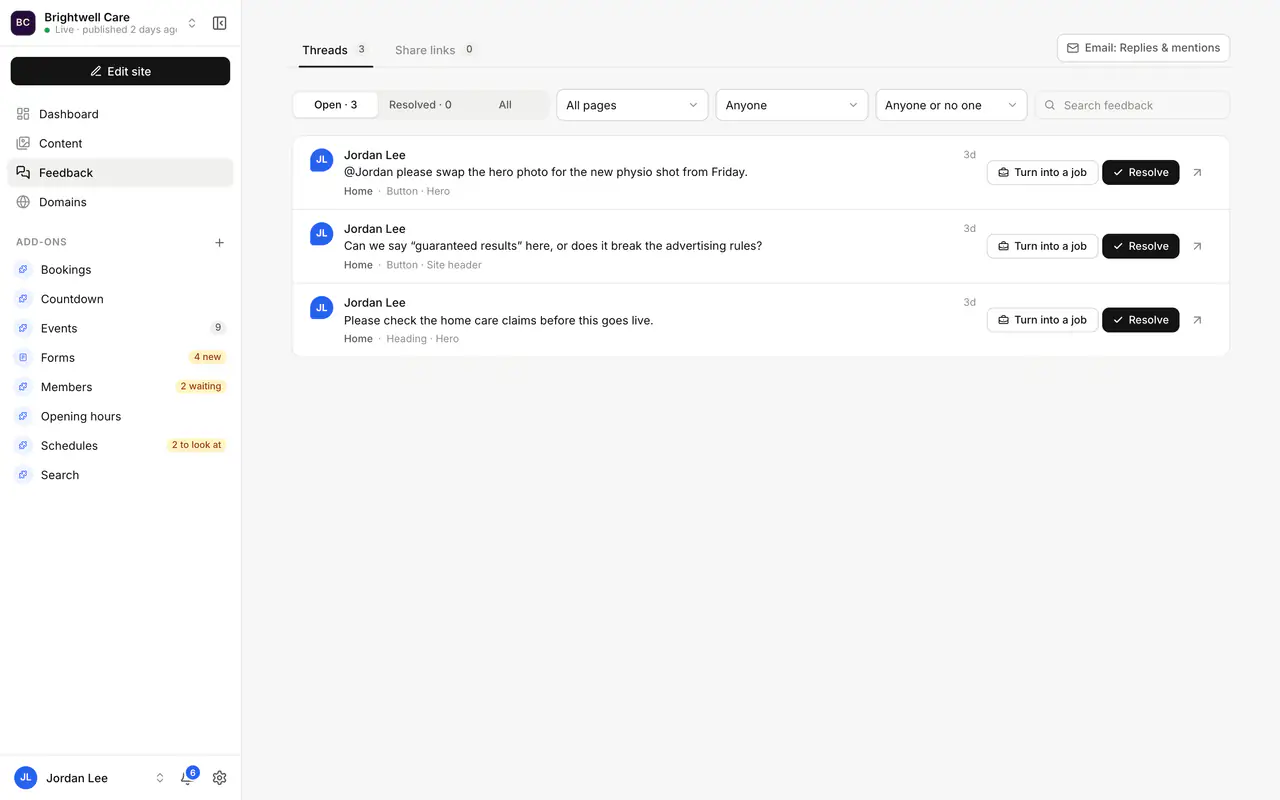
Reviewers open the draft with the Review bar and pin a comment to the words in question. Guests can review through a share link that expires, so an outside adviser can check a page without an account.

  • Pins on content and areas
  • Threads and mentions
  • Expiring share links for drafts
  • Email digests of new feedback
builder.webdirector.net/brightwell-care/feedback
Review comments on Brightwell’s homepage, including a check on an advertising claim.
03A record of what changed

See who changed what, and when

Every page keeps its published versions. Compare any version with today and bring back earlier wording into the draft if a change needs to be undone.

  • Published and autosave versions
  • Compare any two versions
  • Restore into the draft
  • Names shown in history
builder.webdirector.net/brightwell-care/feedback
Each Brightwell comment shows the page and element it is about, and who wrote it.
Questions

Common questions

Does WebDirector make our website compliant with health advertising rules?

No software can do that for you. WebDirector gives you a review step and a history of changes, and your practice remains responsible for what it publishes.

Can we stop testimonials being added?

Only people with publish permission can put changes live, so a reviewer sees every new section before it is published.

Can an outside reviewer comment without a login?

Yes. Send a share link for the draft. It expires, and their comments land in the Feedback admin.

See WebDirector run your websites

Book a walkthrough with the Corporate Interactive team. We will show you the editor, the features your business needs and how your sites would move across.