Book a demo
  1. Home
  2. Features
  3. Review & feedback
Review on the page

Feedback pinned to the page, not buried in email

A Review bar sits on the website itself. Your team and invited guests click any heading, image or area to leave a comment, and every comment stays attached to the content it is about.

A Review bar on the live site
Click to pin a comment
Share a draft with a link
Assign, reply and resolve
Opens at the section it's about

Real WebDirector screens. Click a step, or Replay.

No accountNeeded for guest reviewers
1, 7 or 30 daysShare links expire, or never
Pins and areasComment on content or regions
01Comment where it matters

Click the page, leave a comment

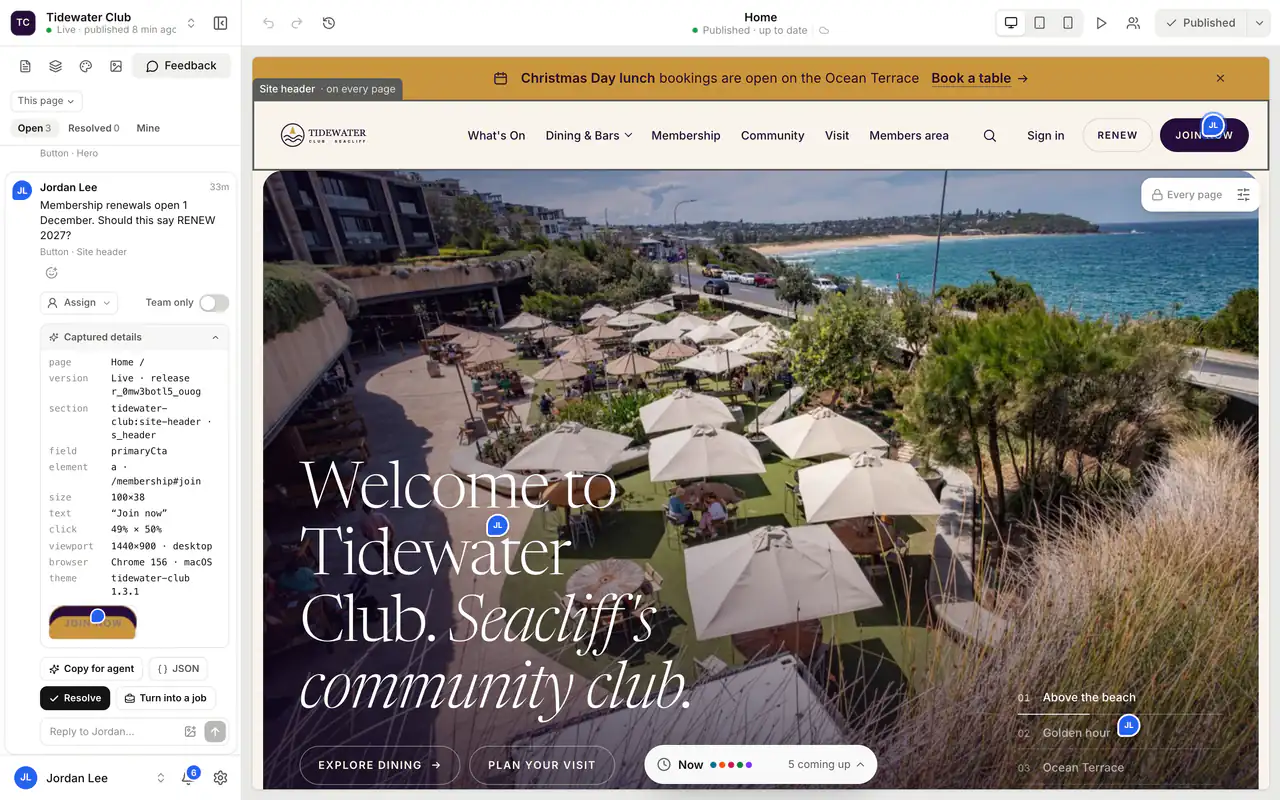
Turn on comment mode and click a heading, an image, a button or a selected phrase. You can also drag a box over part of the page. The pin stays with that content when the page changes or is seen on a phone.

  • Pins attach to content, not screen positions
  • Draw a box to comment on an area
  • A screenshot is captured for the team
  • Live and draft views for signed-in staff
builder.webdirector.net/tidewater-club/edit
Sam O’Connor editing the homepage heading while Jordan Lee watches; the heading is locked to Sam.
02Share a draft safely

Show a draft to people outside

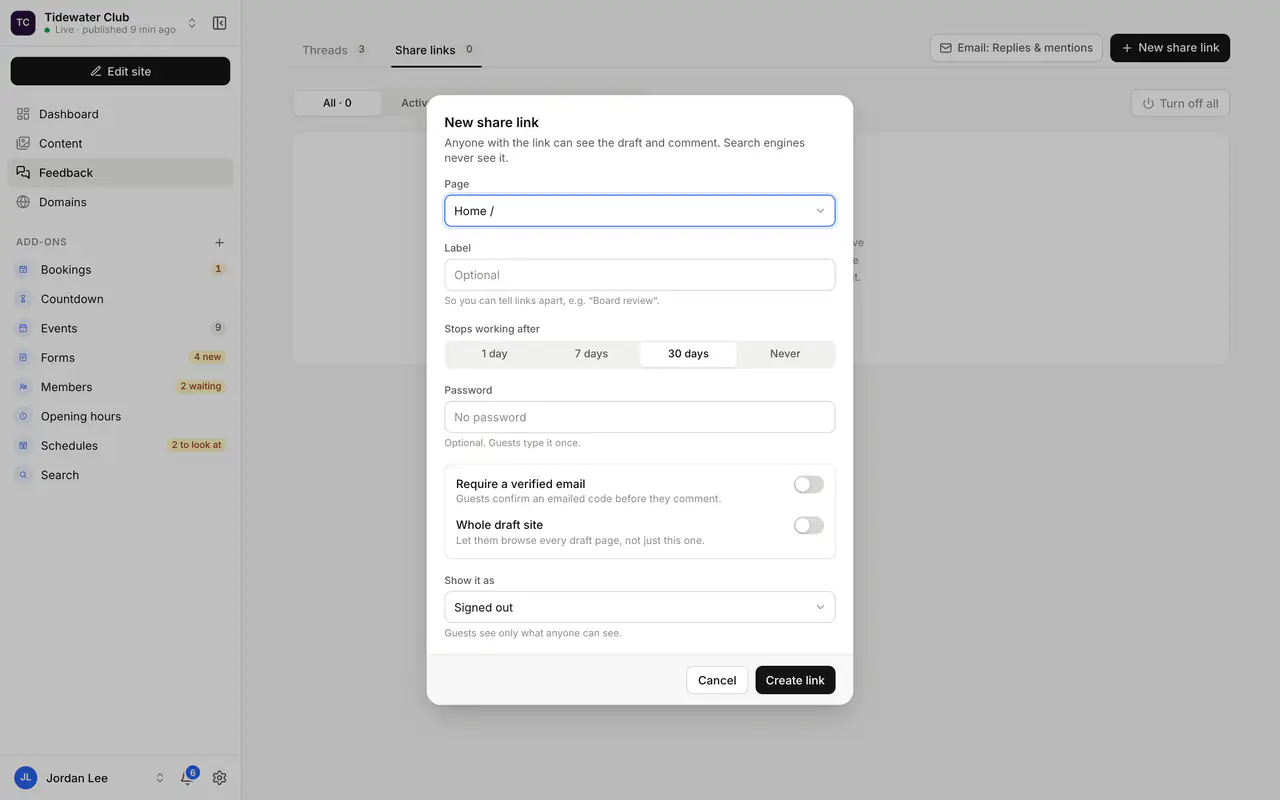
Create a share link for one page or the whole draft site. Set it to expire, add a password or ask guests to confirm their email, and turn it off at any time.

  • Expires after 1, 7 or 30 days, or never
  • Optional password or verified email
  • Guests join with just their name
  • Shared pages are hidden from search engines
builder.webdirector.net/tidewater-club/feedback
Share links for the Tidewater Club draft, with status, expiry and guests.
03Threads, not scattered notes

Every comment becomes a tracked thread

Reply, react, @mention a colleague and assign a thread to someone. Resolve it when it is done. Team-only threads stay hidden from guests.

  • Mentions and assignees
  • Open and resolved filters
  • Team-only threads for internal notes
  • Page chat for general discussion
builder.webdirector.net/tidewater-club/feedback
The Feedback admin listing every thread on the Tidewater Club site.
04From comment to fix

Open the comment in the editor

Each thread opens the editor at the exact section it is about. People get a short email digest of replies and mentions instead of a message for every comment.

  • One click from thread to section
  • Email digests, about every 10 minutes
  • Choose all, replies and mentions, or never
builder.webdirector.net/tidewater-club/edit
The Tidewater Club homepage in the editor, ready to act on feedback.
In the demo

The Tidewater Club demo, one example site, has open threads pinned to the homepage and a share link a guest can use to review the draft without an account.

Tidewater Club Group is a made-up organisation. Its sites use designs from Corporate Interactive’s club concepts.
Ask for a live demo
Questions

Review & feedback, answered

Do reviewers need a WebDirector login?

No. Guests open a share link and join with their name, and an email if you ask for one. Signed-in staff get the Review bar on the live site too.

What happens to a pin when the page changes?

Pins are attached to the content they are about, such as a section, a heading or an item. They follow it when the page reflows or is viewed at another screen size. If the content is removed, the thread is marked as detached rather than lost.

Can I keep some comments away from the client?

Yes. Mark a thread as team only and guests never see it.

Can a share link be turned off?

Yes. Turn off one link, or every link at once, from Feedback. Anyone viewing it is disconnected and sees that the link is no longer active.

Will share links show up in Google?

No. Shared draft pages are marked noindex and are never cached publicly.

See WebDirector run your websites

Book a walkthrough with the Corporate Interactive team. We will show you the editor, the features your business needs and how your sites would move across.