Book a demo
  1. Home
  2. Features
  3. Bookings
Bookings on your site

Bookings that stay on your own website

Clients book an appointment, a class, a table or event tickets without leaving your site. One button can offer every kind of booking, and your team works from one list.

Pick the kind of booking
Visitors pick a time and book
Big groups wait for your OK
Every booking on the calendar
Payments go to your account

Real WebDirector screens. Click a step, or Replay.

4 presetsTables, appointments, sessions, tickets
24 h reminderBy default, 2 to 72 h
Up to 12options in one booking menu
01One system, four kinds

Start from the booking you take

Pick Table, Appointment, Session or Event and adjust from there. A physio clinic uses appointments with staff and services, a training provider uses dated sessions, a restaurant uses sittings and areas, and a conference uses ticket tiers.

  • Areas such as Indoor and Outdoor, with limits
  • Staff hours, services and buffers
  • Notice periods, booking windows and closed days
  • Custom questions and emails per type
builder.webdirector.net/tidewater-club/bookings
Booking types for Lantern Kitchen and the Ocean Terrace at the Tidewater Club.
02One button, every booking

A booking menu that asks first

A booking menu starts the sheet with a choice: a table, Christmas Day lunch, a kids' walk or a function enquiry. Picking an option carries on in the same sheet, opens another menu, or goes to a page.

  • Opening hours shown as words, such as "Open now until 3:30pm"
  • The next date with free places, such as "next: Sun 15 Nov"
  • "Step 1 of 3" so visitors know how long it takes
  • Options move up and down, no dragging needed
builder.webdirector.net/tidewater-club/bookings
The Tidewater Club's booking menu in Add-ons › Bookings › Menus, with four options.
03Many dates, one card

Pick a day, then a time

Visitors book in a sheet drawn in your site's design. An event or session that runs on many days, such as weekend walks three times a day, shows a strip of days and that day's times, and the total uses the type's own word: "2 children · $36".

  • Times held while the visitor finishes
  • Waitlist for full sessions and events
  • Calendar file and private manage link by email
  • Each time shows its label or places left
www.tidewaterclub.example/dining/ocean-terrace
Booking two children on a Tidewater Club rockpool walk: Saturday, then 11:30 am.
04Built for front of house

Today's bookings at a glance

The Today view shows seats per sitting for tables, people choosing a time right now, requests waiting for your OK and every booking for the day. Add phone and walk-in bookings so nothing is booked twice.

  • Mark arrived, no-show or cancelled
  • Approve or decline requests
  • A month calendar across booking types
  • Works on a tablet at reception
Today’s bookings on a phone.
05Payments and reminders

Deposits, payments and fewer no-shows

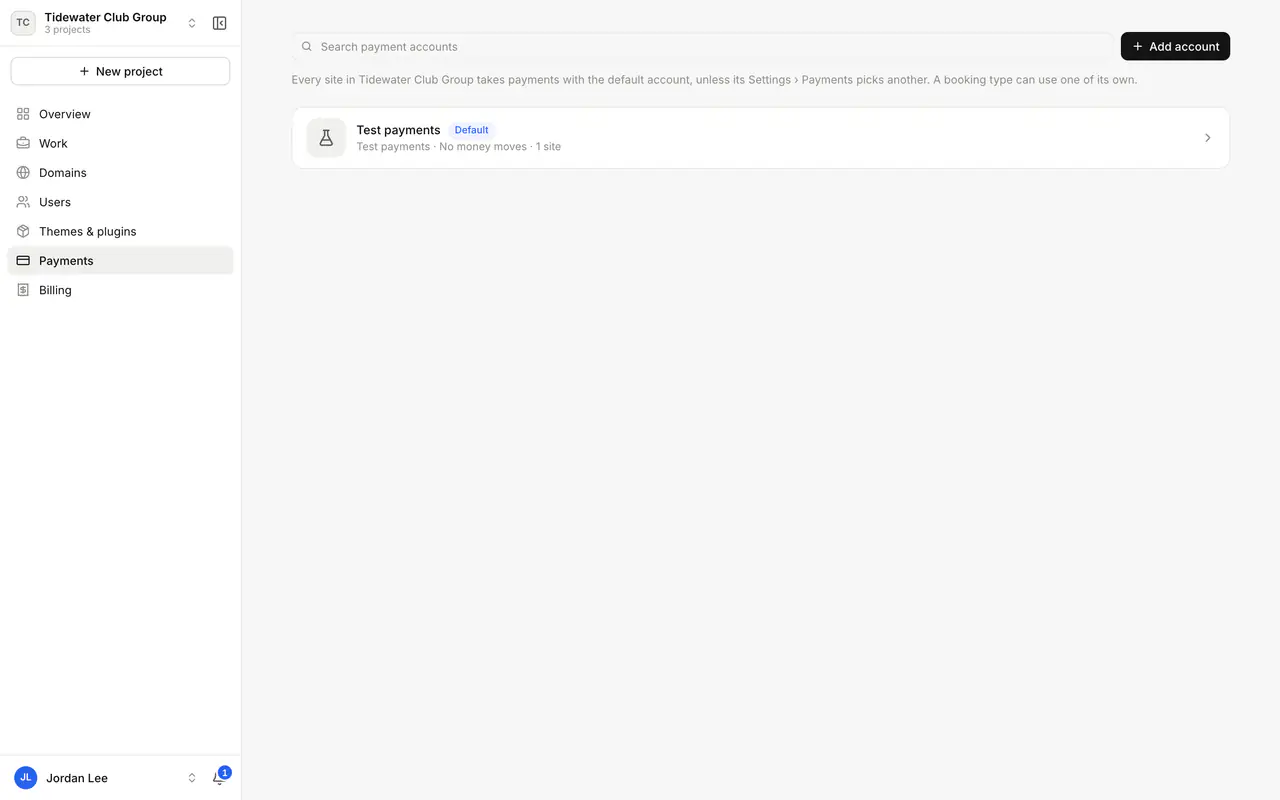
Each booking type can be free, paid in full, take a deposit or hold a card. Payments go to your organisation's Stripe account. Reminders go out before the booking, and cancellations before the cut-off are refunded automatically.

  • Pay in full, deposit or card to hold
  • Apple Pay and Google Pay where available
  • Reminder emails, 2 to 72 hours before
  • Test mode before taking real money
builder.webdirector.net/org/tidewater-club-group
Payment accounts for the Tidewater Club Group organisation.
In the demo

The Tidewater Club demo is one example: a booking menu offers an Ocean Terrace table, Christmas Day lunch, weekend rockpool walks for kids and a function enquiry, and the same tools handle appointments, sessions and tickets for other businesses.

Tidewater Club Group is a made-up organisation. Its sites use designs from Corporate Interactive’s club concepts.
Ask for a live demo
Works with QuoteCloud

Send the paperwork automatically

Connect your WebDirector forms and bookings to QuoteCloud, Corporate Interactive’s quoting, proposal and e-signing platform. A natively connected website, or Zapier, Make or the QuoteCloud API, creates the document from your template the moment someone submits, filled with their details and the lines they chose.

  1. 1

    Someone submits a form, booking or order on your website

  2. 2

    QuoteCloud creates the quote, proposal or contract from your template

  3. 3

    They accept, e-sign and pay online

Questions

Bookings, answered

Do visitors leave our website to book?

No. The booking happens in a section or sheet on your own site, drawn in your site's design.

Can one Book now button offer several kinds of booking?

Yes. Make a booking menu with up to 12 options. Each one opens a booking type, another menu (for example, choose a venue first) or a page such as a function enquiry.

Can we use it with our existing booking system?

Not yet. Bookings currently stand alone as the site's own system. Connections to other booking services are planned for later.

How do we stop double bookings with phone and walk-ins?

Staff add phone and walk-in bookings in the admin, so every place is counted once against the same availability.

Can we take deposits?

Yes. A booking type can be free, paid in full, take a deposit per person or per booking, or save a card so a no-show fee can be charged.

How do customers change or cancel?

Their confirmation email has a private manage link. Cancellations before your cut-off are refunded in full automatically.

Which payment provider do you use?

Stripe. Payment accounts belong to your organisation, and each site, or each booking type, can choose which account to use.

See WebDirector run your websites

Book a walkthrough with the Corporate Interactive team. We will show you the editor, the features your business needs and how your sites would move across.